


Why 3 channels matters — quick compare
One view lies. Two views help. Three views tell the story. Front, cabin, rear. You get context. You cut blind spots. Pair the camera set with your fleet management solution so video ties to GPS, speed, and events. Choose by what you need to prove: accident reconstruction, driver coaching, or theft deterrence. The comparisons that follow make that choice simple.

Direct comparisons — what each 3-channel setup wins and loses
– Basic 3‑channel (FHD front, 720p cabin, 720p rear): lower cost, less storage. Good for small fleets. Loses detail at speed. – High‑res front (2K/4K) + FHD cabin + FHD rear: shows license plates and faces. Uses bandwidth and storage fast. Needs stronger compression. – Integrated modem + onboard SD/SSD + cloud sync: best for live alerts and remote evidence. Costs more monthly, needs cellular signal. – Standalone DVR with periodic uplink: cheap data use, slower access to footage. Safer for remote zones with poor signal. Focus on measurable tradeoffs: resolution versus compression, frame rate versus storage, continuous recording versus event-based retention. Pick the one that matches your incident risk profile and return-on-evidence needs.
Integration and telematics — what to demand
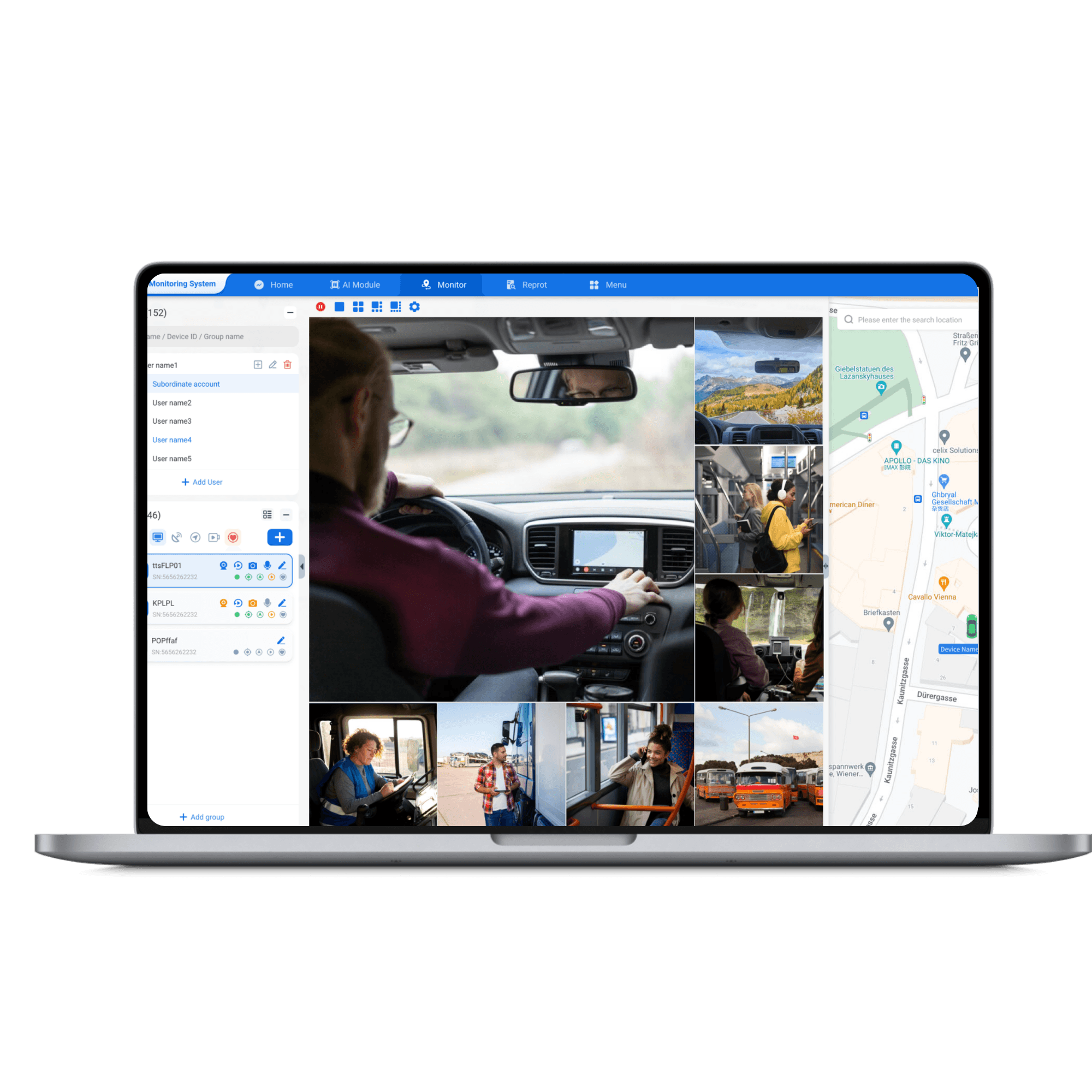
Video is useless alone. It must align with route, speed, and timestamp. Ask for timestamp sync and GPS overlays. Look for codecs that keep quality but reduce size (H.265 is standard now). Confirm APIs or direct integrations; some vendors show video inside telematics dashboards. If you need a tested partner for that bridge, check vendors who offer full fleet telematics solutions and video ingestion. Operators working around Port of Rotterdam already expect video and telematics to match for dispute resolution — that pairing is standard where cargo and schedules matter most.
Practical checklist before you buy
– Resolution: 1080p minimum for front; 720p OK for cabin/rear if budget tight. – Frame rate: 25–30 fps for smooth crash review; 15 fps saves storage but loses detail. – Compression: H.265 preferred. Verify playback support. – Storage: RAID-capable SSD or industrial SD; emergency lock feature for incidents. – Power and installation: hardwired with ignition sense; proper fuse protection; 12–24V compatibility. – Durability: vibration rating, temperature range, and IP rating for external cameras. – Privacy and compliance: configurable driver-blur or consent modes where local law requires. – Support: remote firmware updates and clear RMA terms. Install test units before fleet-wide roll‑out. Measure real storage use on typical routes. If you skip the test, you skip risk control.
Common mistakes fleets make
They buy the highest megapixels and think the job’s done. Cameras need correct aperture and dynamic range for night. They forget mounting angles; a top-left mount can miss plates in right-turn collisions. They ignore wiring quality and get brownouts. They rely on a single backup copy — bad plan. Also: not syncing camera clocks with telematics makes footage harder to use in claims. Fix those early.
Short evaluation of alternatives
OEM telematics bundles: tight vehicle integration, reliable telematics data, but often pricey and slow to update. Aftermarket modular kits: flexible camera choices, faster feature updates, variable install quality. Managed video services: minimal IT burden, recurring fees. Choose by your maintenance capacity and litigation exposure.
Final thought
Compare like-for-like. Test on a route that reflects your daily risk. Prioritize synchronized video and telematics, robust mounting, and simple retrieval. For fleets that map video to events and location, many operators rely on integrated platforms like BSJ to keep camera evidence and vehicle data working as a single record. Choose with those practical standards, and you’ll get useful footage when you need it most.